rgb()The cube
Red, green and blue, zero to 255. Every screen is built on it, so it is where every color starts.
 ColorClerk
Get ColorClerk
ColorClerk2.1 A color picker for macOS
Lift any color off your screen. ColorClerk tells you what it is called, whether text will read on it, and hands it over as HEX, OKLCH, SwiftUI, Tailwind or ten other formats your code already speaks.
30,282 named colors, plotted in OKLab
Hover to read. Drag to turn. Click to pick.Tap a speck to pick it.
01Window
Two hundred and sixty points wide, and it covers everything between spotting a color and shipping it: the current and previous swatch, contrast, the code field, a picker, sliders, fields and your palettes.
This one works. Drag the square, slide the hue, switch formats, hit Copy. It drives the rest of this page, too.
Actual size. The window is 260 by 600 points.
02Lift
The system eyedropper, a click away in the toolbar, the menu bar, a global shortcut of your choosing or the Shortcuts app. The color is on your clipboard the moment you pick it, already in the format you use.
Sampled something outside sRGB on a P3 display? It gets a P3 badge and a color(display-p3 …) value, so nothing is quietly clipped.
03Convert
rgb()The cubeRed, green and blue, zero to 255. Every screen is built on it, so it is where every color starts.
hsl()The cylinderHue around, saturation out, lightness up. Easy to nudge by hand, uneven to the eye.
oklch()The landscapeLightness, chroma and hue, spaced the way eyes see them. Where modern CSS is heading, and where ColorClerk builds its shade scales.
rgb(45 197 187)
Same color, three coordinate systems. ColorClerk keeps one value at full precision and writes it out however you ask, so switching formats never drifts.
Copy As sits on every swatch, in the Color menu and in the menu bar popover. Paste any of these back into the code field and ColorClerk reads it.
04Read
Every sample comes with its WCAG ratio and APCA Lc against white and black, right under the swatch, and the closest of 30,282 color names. The field on the right is every one of those names, sorted by the text that reads on it.
#2DC5BB05Keep
Palettes of up to fifty swatches, as many as you need, saved as you edit. Drag to reorder. Take them anywhere: Adobe .ase for Photoshop and Illustrator, GIMP .gpl, CSV, Design Tokens JSON, CSS variables or an Apple .clr list, every swatch with its name.
Everything you pick on this page lands here.
Eleven steps from 50 to 950, built in OKLCH so they look evenly spaced, each one pulled into sRGB.
06Stay
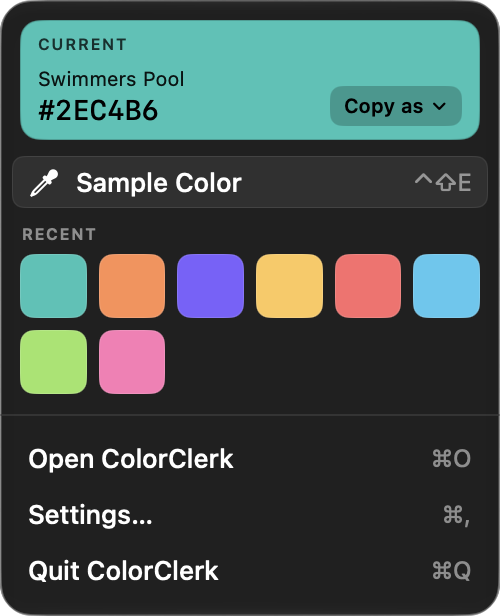
The last sample, your recent samples and Sample Color wait in the menu bar. The window can float on top, tuck away into the menu bar or open at login. On macOS Tahoe it wears Liquid Glass; before that, and with Reduce Transparency, it stays flat. Check for Updates… asks the App Store for the latest version, only when you choose it.

07Write
A format you miss, a bug you hit, a palette you are proud of. Write, and the person who makes ColorClerk writes back.